
Logo

Welcome to Poshmark's Seller Knowledge Base

Search our Poshmark seller knowledge base for FAQs...

I'm currently an existing manual seller on Poshmark. What do I need to do to get my closet ready for a dropship integration?

Setting Up My Poshmark Closet

I'm currently an existing manual seller on Poshmark. What do I need to do to get my closet ready for a dropship integration?

Last updated on 21 Oct, 2025

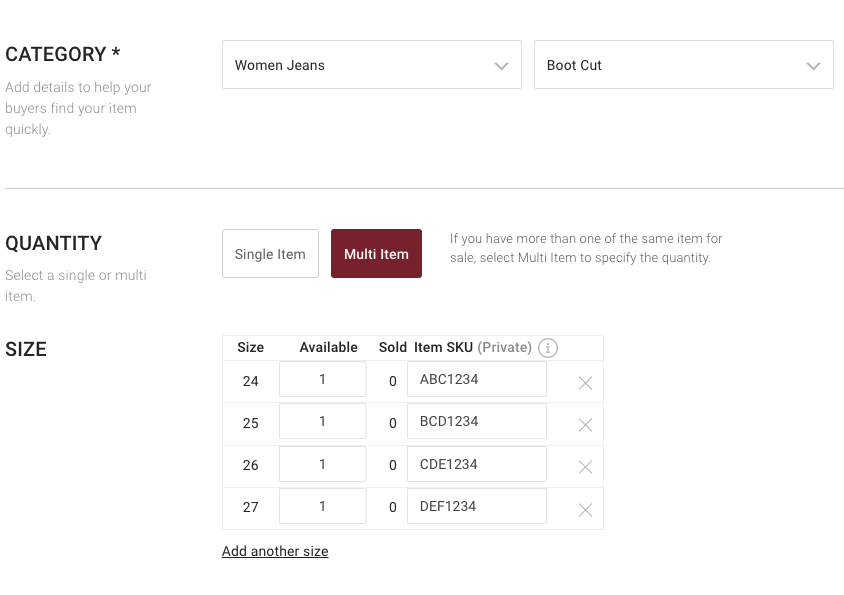
If you are an existing seller on Poshmark who already has listings live, and want to transition to use our dropship capabilities (e.g., DSCO, Rithum, ChannelAdvisor, CommerceHub), it is imperative that you have item SKUs loaded onto all of your For Sale items in order for your closet to be properly connected via any dropship integration.  Please ensure that these are Item SKUs (loaded at the size / inventory level), not Listing SKUs. 
Image


You can add item SKUs by using our listing creation flow within the platform or using our Bulk Listings Actions Add Item SKU feature.


Did you find this article helpful?
Previous

Why do I need to enter my Tax ID Information?

Next

© 2025 Poshmark, Inc